Quiet churn detection

See which customers are quietly leaving, before they are gone for good.

QuietLeave shows the regular customers who stop using, buying or staying. You send an export from your own system and the same day you get a list of who to reach out to.

60 days of beta, free. We help you upload your data.

Customers to reach out to Demo example
  • kl_48213
    Was due to buy 12 days ago
    Overdue
  • kl_20871
    Buys half as often as usual
    Fading
  • kl_77304
    Next purchase coming up soon
    Due soon
You choose the labels yourself, with no e-mails or phone numbers. Every status can be explained in one sentence.

You find out a customer has left after the fact.

From an invoice, a missing order, an empty calendar. By then it is usually too late to ask what happened. QuietLeave shows it earlier: who is going quiet, and since when.

How it works

  1. Send your data

    An export of orders, bookings or activity from your own system. We will help you with the first upload. SaaS teams can use the API too.

  2. See the list

    The same day: who is going quiet, since when and what they are roughly worth, under the labels you chose.

  3. Act

    A daily summary in your inbox whenever someone new lands on the list, and a list export for your campaigns.

For businesses whose customers come back.

For SaaS

Your customers leave quietly. See who stops using your product before they cancel.

Send account activity data (a database export or the API). The list of fading accounts is ready the same day.

  • See the accounts that stopped logging in or have been fading for weeks.
  • No analyst needed: you do not build cohorts or dashboards.
  • A daily summary in your inbox whenever someone new lands on the list.

For shops

Regular customers stopped coming back? See who is late with their next purchase.

Send an order export from your shop. The list of customers to win back is ready the same day, with no plugins and no change to your mailing tool.

  • We learn each customer's own rhythm, so “overdue” means overdue by their habit.
  • Two lists: who is running late, and whose next purchase is coming up.
  • Works at small scale: a new customer gets your shop's typical rhythm.
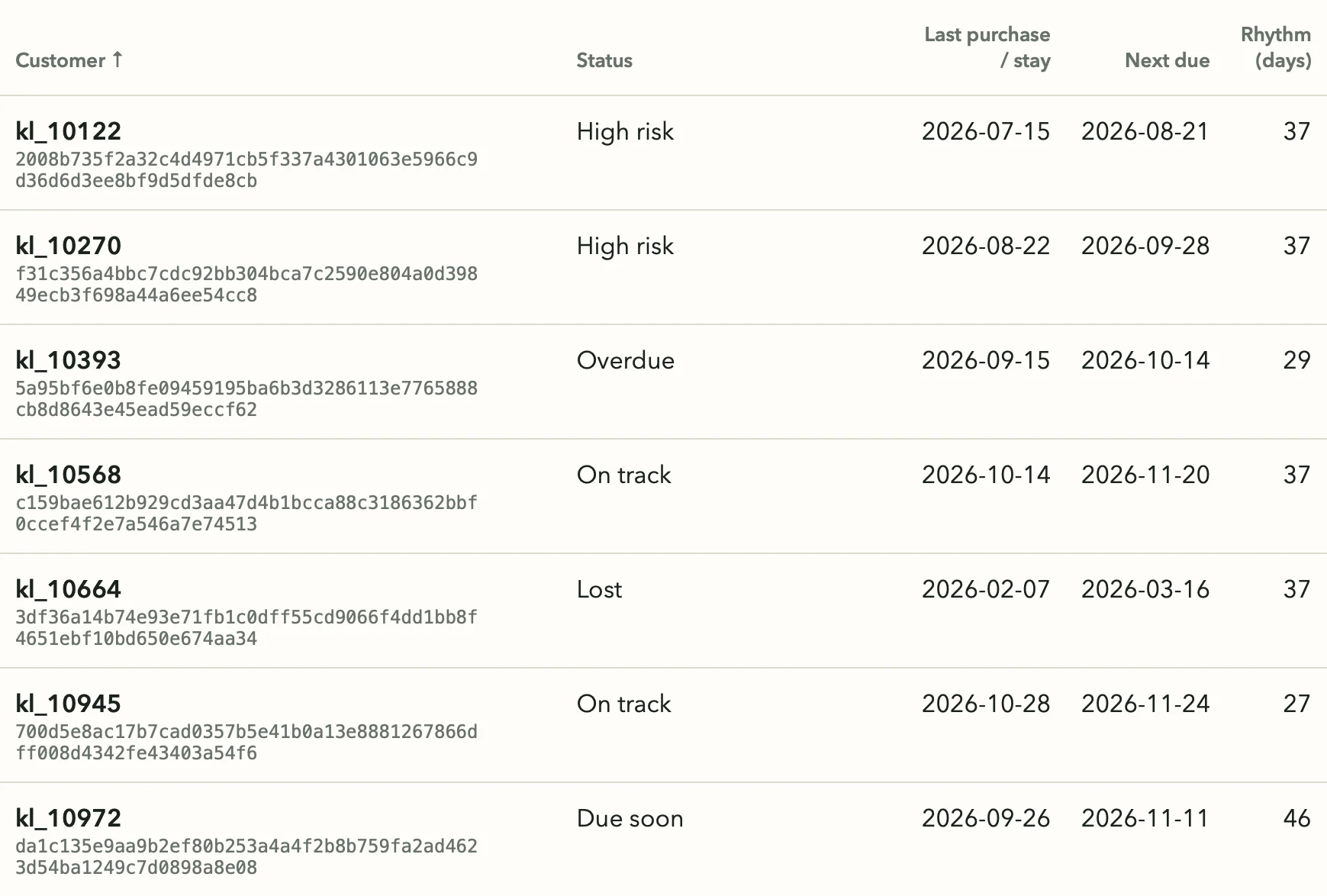
Customer list of a shop in the QuietLeave dashboard, demo data. Each customer has a label, such as kl_10122, and a status: High risk, Overdue, On track, Lost or Due soon.
The QuietLeave dashboard with a demo shop's data. For each customer you see the status, the last purchase and when the next one is due. You choose the labels yourself, with no e-mails or phone numbers. Open the full screenshot

For hotels

Which regular business guests stopped staying with you? And who should be arriving soon?

Send a booking export from your hotel system. The list of guests to remind is ready the same day.

  • See the guests and companies that are late with their next stay, even when they use different properties in a chain.
  • Future bookings are taken into account: a guest with an arrival already planned does not end up on the at-risk list.
  • Minimal data: a profile or company number, arrival date, stay value.

Why QuietLeave

Simple

Start from an export, with no integration project and no plugins.

Explainable

Every status can be described in one sentence. It is a transparent rule, not a black box.

Lean on data

A customer number and an event date. No e-mails or phone numbers.

At a sensible scale

Works from a few hundred customers, with no analytics team.

Customer data

We process customer identifiers in pseudonymised form and do not accept e-mail addresses or phone numbers. The application servers and the database are hosted in the European Union.

Beta for design partners

60 days free in exchange for a short conversation about what works. We set pricing after the trial together with our partners.

What the terms in the app mean

Three terms you will see on the customer list, explained without formulas.

Engagement velocity shown as “Velocity” in the app

Tells you whether a customer is using your product as much as usual. We take their last week and compare it with their typical week over the last 30 days. 1 means: as usual. 0.5 means: half as much as usual. The lower the number, the quieter the customer is getting. We calculate it for SaaS. For shops and hotels we check instead whether the customer comes back in their usual rhythm.

kl_31560Example
Average week10 logins
Last week4 logins
A customer usually logs in 10 times a week, only 4 times last week. Velocity 0.4: less than half of their usual activity.
High risk HIGH_RISK

The status of a customer who clearly departs from their own habit. In SaaS: velocity has dropped below 0.5, although the customer was active on at least a few days in the last month. In a shop or hotel: the next purchase or stay is much later than usual. It is a rule you can explain in one sentence, not a score of how likely they are to leave.

kl_90412Example
Usual gap3 weeks
Current gap11 weeks
Usually buys every 3 weeks, last purchase was 11 weeks ago.
Revenue at risk shown as “Estimated Revenue at Risk” in the app

The estimated monthly value of the customers on the at-risk list: what they usually bring in per month. We take it from the values in your data or, where they are missing, from the default customer value you set. It tells you where to start. It is an estimate, not a calculation of a loss.

kl_90412Example
Purchase rhythmevery 3 weeks
Purchases a monthabout 1.4
We count1.4 × average order
A customer who buys every 3 weeks buys about 1.4 times a month: we count 1.4 × their average order.

Questions and answers

What data do I need to send?

For each event: the customer number from your system (not an e-mail or phone number), a date and, optionally, a value. Shops: orders. Hotels: arrival date. SaaS: account activity.

I do not know how to make an export. What now?

We will show you step by step for your system. For the first upload we help on a 30-minute call. We accept data as a CSV file, which opens in Excel. If your system only offers Excel, save the file as CSV or we will help.

How much history do I need?

Roughly the last 4 months for SaaS, a year for shops and two years for hotels. With a lot of data, daily totals per customer are enough.

Is this artificial intelligence?

No. It is a transparent rule: we compare a customer's activity with their own rhythm. You can see why a customer landed on the list.

I already have a mailing tool with segments. Do I need QuietLeave?

If your tool already gives you a segment of dormant customers or an expected order date, you may not need us. If not, you get one simple list of “who to win back” without changing your tool.

How much does it cost?

The beta is free for 60 days. We set pricing together with our partners after the trial.

Find out who is going quiet before they are gone for good.

We are looking for a few businesses for free trials. 60 days, we help you upload your data, and in return we ask for a short conversation.

Become a design partner